Random
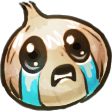
party hat starburstq
:party_hat_starburstq:
Also matches: party hat starburstq · party-hat-starburstq · partyhatstarburstq
- Format
- PNG
- Size
- 128 × 125
- Animated
- No
:party_hat_starburstq:
Also matches: party hat starburstq · party-hat-starburstq · partyhatstarburstq
#general
this is exactly the kind of we needed in #general
102Inline at 22px like Slack renders it. Reactions are pills with the emoji + count.
PNG above. It's already sized 128×128 — exactly what Slack wants.Need it for a different chat app? PNG and GIF emoji work the same way in Discord, Mattermost, Rocket.Chat, and most modern chat tools.
party hat starburstq sits in the Random category — typical territory for general reactions, miscellaneous in-jokes, and the catch-all #general vibes. Format is PNG, dimensions 128×125, static (no playback required).
No account, no signup, no ads. party hat starburstq downloads as a single PNG file you can drag straight into Slack's emoji uploader.